
Amazon content workflow
AI Amazon A+ Content Generator
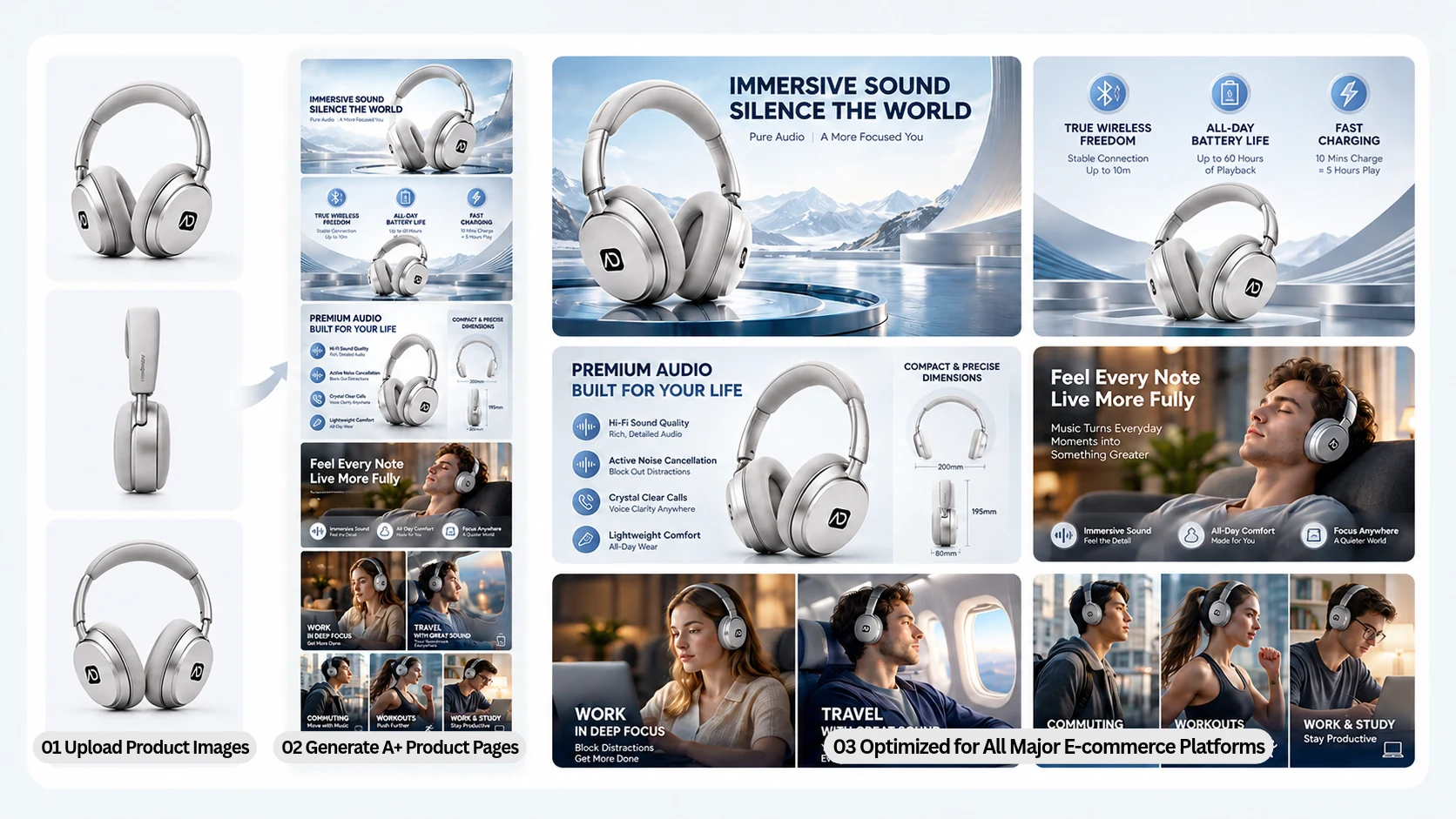
Plan and generate Amazon A+ content modules with product visuals, benefit sections, usage scenes, specifications, and brand storytelling in the right image profiles.
Direct answer
What is AI Amazon A+ Content Generator?
Use a product reference and a structured module plan to create the visual building blocks for an Amazon A+ detail page. AIDesigners supports standard and premium A+ directions while keeping the image brief attached to each module.
Evidence from the product
A+ content example
Product facts
What the current workflow supports
- Module library
- 16 module types from hero visual to usage guidance
- A+ profiles
- Standard A+, Premium A+ Web, and Premium A+ Mobile
- Known dimensions
- 970×600, 1464×600, and 600×450
- Common modules
- Hero, benefits, lifestyle, detail, comparison, specifications, brand story
How it works
From brief to usable creative
- 01
Define the product truth
Add the product reference and provide only confirmed benefits, materials, dimensions, and support information.
- 02
Select the A+ modules
Choose the modules the detail page needs: hero, benefits, usage scene, detail, comparison, specifications, materials, or brand story.
- 03
Generate by profile
Use the standard or premium dimension profile, then review the image and any overlaid copy before uploading it to Seller Central.
Use cases
Where this workflow fits
- Amazon A+ hero sections
- Premium A+ brand story blocks
- Feature and benefit modules
- Specification and dimensions panels
- Product comparison and lifestyle sections
Review before publishing
Important limitations
- AIDesigners generates visual assets; it does not submit or approve an Amazon detail page.
- Do not ask the model to invent certifications, measurements, ingredients, warranty language, or performance claims.
- Amazon placement and content policies can change, so check the current Seller Central requirements.
Frequently asked questions
AI Amazon A+ Content Generator FAQ
Does AIDesigners generate Amazon A+ modules or a complete listing?
It generates the visual modules and image directions used in an A+ detail page. You still assemble and publish the final content in your Amazon workflow.
What size is Amazon Premium A+ content?
The current workflow includes Premium A+ Web at 1464×600 and Premium A+ Mobile at 600×450. It also includes a Standard A+ profile at 970×600.
Can I create an A+ comparison chart?
Yes. Comparison is one of the available A+ module directions, but every comparison point should be based on confirmed product information.
Does it guarantee Amazon approval?
No. It creates image assets and does not guarantee marketplace approval. Review the final text, claims, dimensions, and Amazon requirements before publishing.