
Wearable product workflow
AI Virtual Try-On for Ecommerce
Create wearable-product and outfit-swap images with selectable models, poses, shots, styles, and channel-ready aspect ratios.
Direct answer
What is AI Virtual Try-On for Ecommerce?
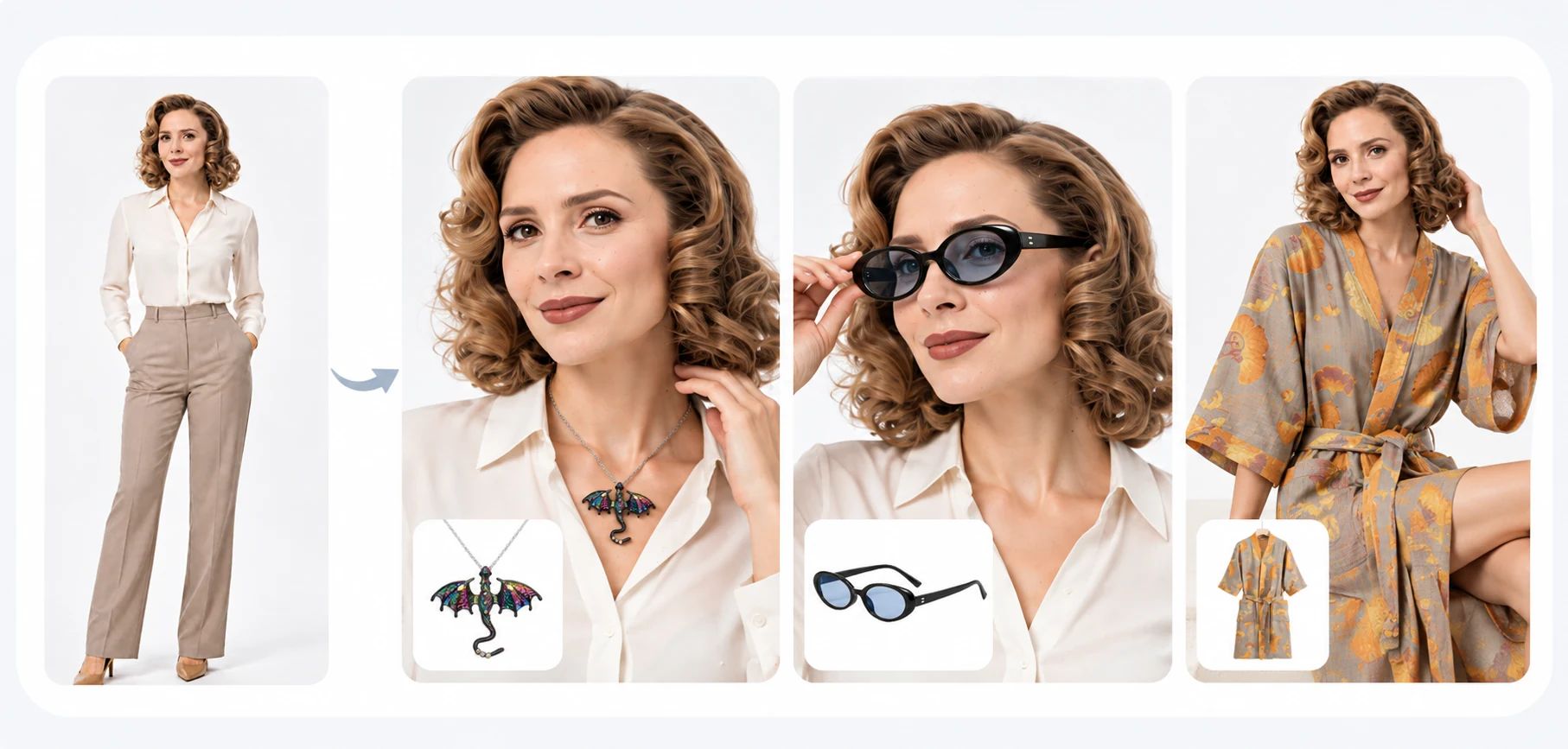
Show how a wearable product looks in context without arranging a new shoot for every pose or placement. The try-on workflow combines product references with reusable model, pose, shot, style, and size choices.
Evidence from the product
AI try-on example

Product facts
What the current workflow supports
- Model presets
- 16 selectable model presets
- Pose choices
- 8 actions from standing to walking and seated
- Shot choices
- Close-up, upper body, three-quarter, and full body
- Output
- Up to 8 outputs, GPT-Image-2.5, 2K quality, 1:1 / 3:4 / 9:16 / 16:9
How it works
From brief to usable creative
- 01
Add the wearable product
Upload a ring, bracelet, watch, necklace, earrings, eyewear, hat, bag, shoes, or another wearable product reference.
- 02
Choose a scene direction
Pick a model, action, shot, style, and product type. You can create a clean studio direction or a warmer lifestyle presentation.
- 03
Export the right crop
Choose square, portrait, story, or landscape output, then review the product placement, scale, and details before using the image commercially.
Use cases
Where this workflow fits
- Jewelry product pages
- Watch and eyewear campaigns
- Fashion accessories
- Social commerce visuals
- Marketplace and catalog refreshes
Review before publishing
Important limitations
- Try-on is a visual approximation, not a sizing or fit guarantee.
- Small details such as engraved text, stone settings, and exact material finish should be checked against the reference.
- Do not use a generated image as evidence of a product's fit, safety, or physical performance.
Frequently asked questions
AI Virtual Try-On for Ecommerce FAQ
What products work with AI virtual try-on?
The workflow includes automatic detection plus product types for rings, bracelets, watches, necklaces, earrings, eyewear, hats, bags, shoes, and other wearable products.
How many try-on variations can I create?
The workflow supports up to eight outputs per try-on generation, with selectable models, actions, shots, styles, and output sizes.
Can I make jewelry try-on images?
Yes. Rings, bracelets, watches, necklaces, and earrings are explicit product-type options in the current workflow.
Does virtual try-on guarantee the real-world fit?
No. It creates a visual presentation of how the product may look in a scene. It is not a measurement, sizing, or fit guarantee.